

How to Turn Substack's Note Scheduler Into a Growth Machine
The algorithm shifted. Here's how I'm shifting with it.

7 days ago I sat down with my coffee, opened Substack, and scheduled 27 Notes for the week.
All of them. In one sitting.
By Friday, 4 of those Notes had brought in 337 new subscribers. Consistent, personal, and timed right. That’s what’s important right now.
Substack finally rolled out a native Note Scheduler, and if you're not using it yet, you're leaving growth on the table. I've been testing it obsessively, and I want to share exactly what's working.
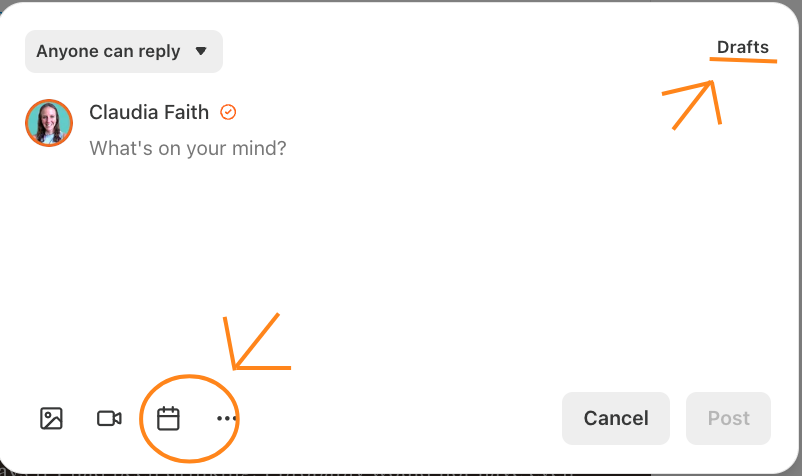
Let's dive in.
1. Aim for 3 to 5 Notes Per Day
I know that sounds like a lot. It's not.
Most of your Notes don't need to be long. A quick photo from your morning walk. A one-liner about something you're working on. A screenshot of a comment that made your day.
3 to 5 Notes per day keeps you visible in the feed without burning out. Some will be 2 sentences. Some will be a photo with a caption. Mix it up.
The algorithm rewards consistency. Showing up once a day is good. Showing up 3 to 5 times is where the compounding kicks in.
2. Schedule Notes That Match Your Upcoming Post
This is the one most people miss.
If your article drops on Thursday, your Notes earlier that week should build toward that topic. Not in a "hey, new post coming!" way. More like breadcrumbs.
Say your article is about growing your first 1,000 subscribers. On Monday, share a Note about a specific subscriber milestone you hit. Tuesday, post a screenshot of your stats from the early days. Wednesday, share a quick tip about what worked for you at that stage.
By the time your article goes live, your audience has been thinking about that topic for days. They're primed. They click.
I schedule 2 to 3 of my daily Notes to tie thematically to whatever I'm publishing that week. The rest are personal.
3. Be Unapologetically Personal
I cannot say this enough.
With AI-generated content flooding every platform, the thing that makes people subscribe, stay, and share is you. The real you. Not the polished, curated version. The messy, in-progress, figuring-it-out version.
Share a photo of your workspace. Talk about the rejection email you got. Post a selfie from the coffee shop where you write. Show people what your Tuesday afternoon actually looks like.
I started posting more and more personal Notes about 2 months ago. Photos of me working. Stories about my day. Honest updates about what's hard. My engagement went up 40%.
In a world full of AI-generated sameness, your personality is your competitive advantage. The Note Scheduler lets you plan this. Schedule 1 to 2 personal Notes per day alongside your strategic ones.
4. Leave Room for Spontaneous Notes
Here's where I see people go wrong with scheduling. They fill every slot and then go silent when something real happens.
Don't do that.
I schedule about 60% of my Notes for the week. The other 40% stays open for real-time moments. A conversation in the comments that sparks an idea. Something trending in your niche. A win you want to celebrate right now, not next Tuesday.
Scheduled Notes keep you consistent. Spontaneous Notes keep you human. You need both.
5. Vary Your Content Types
Text-only Notes are fine. But mixing in images, videos, and screenshots consistently outperforms plain text.
Here's my weekly mix:
50% text Notes (tips, insights, one-liners)
30% image Notes (photos of my daily life, screenshots, behind-the-scenes)
20% article shares (my own posts, re-shares of Notes that performed well)
The feed rewards variety. When someone scrolls past 15 text Notes and then sees your face or a colorful screenshot, they stop. That's the goal.
6. Know When Your Audience Is Most Active
Not all time slots are equal.
Check your Substack stats. Look at when your Notes get the most engagement. For most newsletters, the sweet spots are:
Early morning (6 to 8 AM in your audience's time zone)
Lunch break (11:30 AM to 1 PM)
Evening wind-down (7 to 9 PM)
I spread my scheduled Notes across all three windows. One in the morning, one or two around lunch, one in the evening. This way, no matter when someone opens Substack, there's a recent Note from me in their feed.
Test different times for 2 weeks and track what works for your specific audience. My morning Notes consistently outperform my evening ones, but yours might be different.
7. Weekends Are Underrated
Most creators go quiet on Saturday and Sunday. Which means less competition in the feed.
I schedule at least 2 Notes per weekend day. Usually more personal ones. A photo, a reflection, something lighter. Weekend Notes consistently get strong engagement because fewer people are posting but plenty of people are scrolling.
Don't skip weekends. Your audience is there even if other creators aren't.
8. Repurpose Your Best Performers
Here's a trick that saves me hours. When a Note does well, I don't let it die.
2 to 3 weeks later, I'll reschedule a version of it. Same core idea, slightly different angle or updated with new numbers. Most of your audience didn't see it the first time anyway. Substack shows Notes to different people at different times.
I keep a running list of my top 10 Notes and rotate them back every now and then. Works every time.
9. Use It as a Content Calendar
Once you start scheduling Notes for the week, something clicks. You can see your whole week laid out. You spot the gaps. You notice when you have 4 text Notes in a row and no images. You catch that you forgot to tease Thursday's article.
Think of the scheduler as your visual content calendar. Before I had this, my Notes were random. Now they're intentional. The growth followed.
10. Batch Schedule to Save Your Sanity
Here's my exact system. Every Sunday, I sit down for about 45 minutes and schedule the week's Notes.
I write 15 to 20 Notes in one sitting. Thematic ones tied to my upcoming post. Personal ones. Quick tips. A few repurposed favorites.
If you want to go even further with batch scheduling, I built a scheduler that connects directly with Substack's native API. You write and schedule all your Notes for the week without leaving your laptop open. It syncs automatically with Substack so your Notes go out exactly when you set them.
It’s part of my paid subscription. If you upgrade, you get lifetime access.
This one workflow turned Notes from a daily chore into a weekly system. 45 minutes on Sunday, and I'm visible all week.
Was this helpful? 🧡
If you found this helpful, please share it with a fellow Substack writer who’s trying to grow their audience. Or leave a comment. We all grow together.
P.S. - Can you believe there are more than 13,000 of us here now? 🤯
If you are thinking about monetizing your efforts like the other 13,000 creatives, then join our Wander Wealth Community.

P.P.S. - New to Substack? Check out my resources to get started.
Loving the new notes scheduler. And your tips work! ~ Rosie
Thanks, great advice.
Except I don't believe nr 2.
Nobody in the world is going to feel excited about one or two notes building up anticipation towards a post two days later. I mean, seriously, it just a blog post. Not a bunch of free Shania Twain tickets. Nobody cares.