

Your Substack Has a Leak. Here's How to Find It in 10 Minutes.
3 small fixes that stop your readers from slipping away

Last month I ran a growth audit on my own Substack. Nothing fancy. I sat down with coffee and tried to answer one question: where am I losing people?
I expected to find nothing. I’d been publishing consistently for two years. My Notes were scheduled. My content was solid. My subscriber count was climbing.
But when I actually followed the path a new reader takes from the moment they land on my page to the moment they decide to pay, I found three spots where people were quietly slipping away. My writing was fine. Three small things were just set up wrong.
I fixed all three in under an hour. My paid conversion rate went up within two weeks.
Today I’m going to walk you through exactly what I checked, what I found, and how I fixed it. You can do the same audit on your own Substack in about 10 minutes.
I started here from 0 exactly 2 years ago. Now over 17k+ people are in my community. If you want the templates, the systems and the playbook from someone who’s been through and knows what’s working right now, join me.
Leak 1: Your welcome email is wasting your best open rate
When someone subscribes to your newsletter, Substack sends them a welcome email. That email gets an open rate north of 70%. Sometimes 80%. That’s the most-opened email you will ever send to that person.
And most writers leave it on the default setting.
I did too, for longer than I want to admit. My welcome email said something like “Thanks for subscribing to Wander Wealth!” and that was basically it. Polite. Forgettable. A wasted handshake.
Here’s how to check yours: go to your Substack dashboard, click Settings, then Emails. Your welcome email is right there. Read it like a stranger would. You want it to tell them what to expect, give them a reason to open your next email, and actually sound like you.
I actually enabled a drip campaign for me, where new subscribers get a sequence of emails. Unfortunately, there are no stats yet on these, so I cannot tell you actually how many times these have been opened.
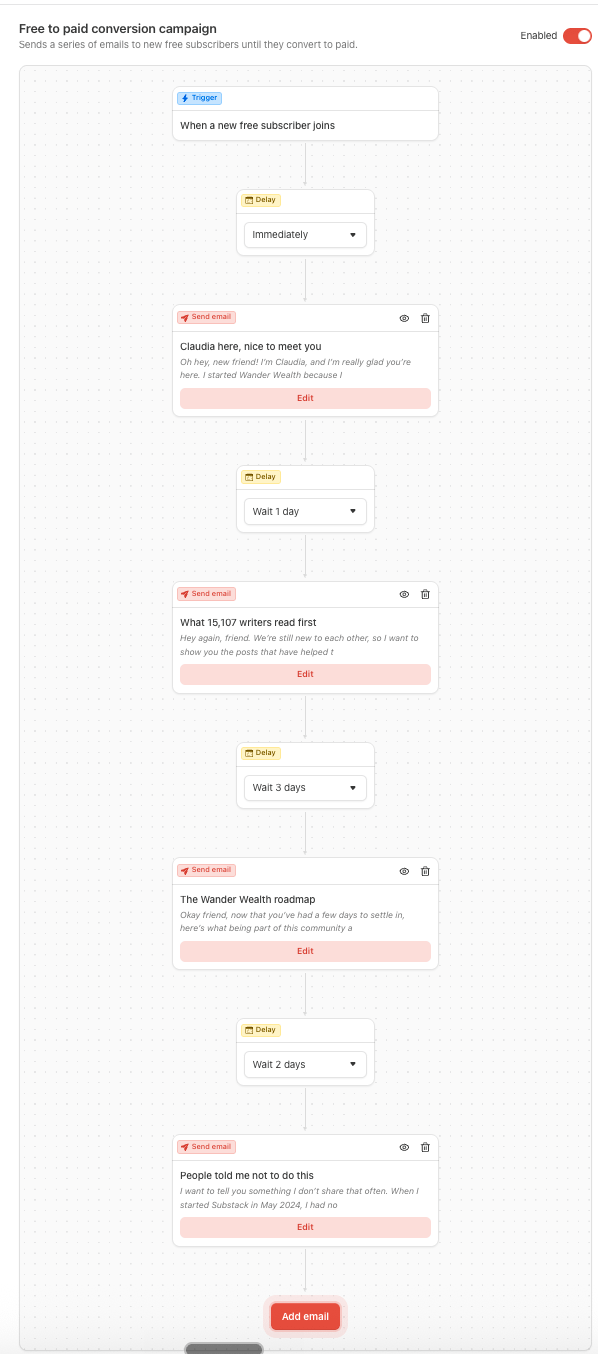
When I rewrote mine, I kept it short. What I publish and when. What they should read first (I linked my most popular post).
Quick tip: don’t overthink the length. Three to five sentences is plenty. The goal is warmth and direction, not a sales pitch.
Leak 2: Your pinned post is showing visitors the wrong first impression
When someone clicks on your Substack publication, the first thing they see is your pinned post. If you haven’t pinned anything, they see whatever you published most recently.
That might be fine. Or it might be a post about a niche topic that doesn’t represent what your newsletter is actually about.
I noticed this when I looked at my profile from a logged-out browser. My latest post was a detailed piece about AI tools for creators. Good post. Solid engagement from my existing readers. But if someone landed on my page for the first time because they saw a Note about Substack growth, they’d see an AI article and think “this isn’t for me.”
The mismatch was costing me subscribers I’d already done the hard work to attract.
Here’s the check: open your Substack in an incognito window. Pretend you’ve never seen it before. You want the first post a stranger sees to match the promise of your publication and show your best work. If a stranger would read the title and think “this isn’t what I signed up for,” you’ve got a leak.
I pinned my Start Here post from last year recently. The one that consistently brought in new subscribers and had a clear, specific title that told people exactly what Wander Wealth is about. My profile now works like a landing page instead of a reverse-chronological blog.
If you’re not sure which post to pin (or you don’t have a start here yet), look at your stats. Find the one with the highest subscriber conversion, not the most likes. Those are very different things. A post with 50 likes and 40 new subscribers is a better pin than a post with 200 likes and 8 new subscribers. The second one got attention. The first one actually grew your newsletter.
Leak 3: There’s no bridge between your free readers and your paid tier
This was the biggest one for me. And it’s the one I see in almost every Substack I audit for coaching clients.
Most writers have free posts and paid posts. But there’s nothing in between. Free readers have never seen what the paid content looks like, and they have zero reason to think it’s worth $17 a month.
That’s a big leap of faith to ask from someone who’s never peeked behind the paywall.
I had the same problem. My free posts were solid. My paid posts were, honestly, even better. But nobody could tell, because they couldn’t see any of it.
So I started doing two things.
First, I created what I call “window posts.” These are paid posts where the first 60% is free and genuinely valuable on its own. The paywall kicks in right when the reader is most engaged, right when they’ve gotten enough value to think “okay, I want the rest of this.” I publish one of these every two to three weeks, mixed in with my regular free posts.
The placement of that paywall matters a lot. If it’s too early, it feels like a bait-and-switch. If it’s too late, there’s no reason to upgrade. I put mine right after the framework or the core insight, just before the implementation details and the templates. The free part proves I know what I’m talking about. The paid part helps them actually do it.
Second, I added a single line to the bottom of every free post, right above my regular CTA section. Something like: “This week’s paid post breaks down my exact welcome email template with fill-in prompts. Paid members, check your inbox Thursday.”
No pressure. No “UPGRADE NOW” energy. Just a mention of what paid subscribers are getting this week, so free readers know it exists. Over three months, I watched my free-to-paid conversion rate climb steadily. Most of the upgrades came from people who’d been reading my free posts for weeks before they finally clicked.
The 10-minute audit
You can do everything I just described in one sitting. Here’s the checklist:
Go to Settings, then Emails. Read your welcome email out loud. If it sounds like a robot wrote it, rewrite it in your own voice with a link to your best post and an invitation to reply. Five minutes.
Open your Substack in an incognito window. Look at the first post a stranger would see. If it doesn’t represent your best work and your core topic, pin a better one. Two minutes.
Look at your last 10 posts. Count how many give free readers a taste of your paid content. If the answer is zero, plan one window post for next week. Three minutes to plan, and you’ll write it on your regular schedule.
You don’t need a redesign. You don’t need more content. You just need the content you already have to work as hard as you do.
I spent two years focused on publishing more. Another post, another batch of Notes, another live session. And all of that mattered. But the biggest jump in my paid conversions came from fixing the path people take through what already existed.
Your Substack probably doesn’t need more content. It needs fewer leaks.
Next week, my premium subscribers get insights into what is working right now on Substack to earn money.
If you want in and earn with your words on Substack, join us.
Was this helpful? 🧡
If you found this helpful, please share it with a fellow Substack writer who’s trying to grow their audience. Or leave a comment. We all grow together.
P.S. - New to Substack? Check out my resources to get started.
The 'window post' strategy for Leak #3 is absolute genius Claudia. Placing the paywall exactly between the 'what/why' and the 'how-to/templates' is such a clean, respectful way to convert.
It's crazy how much time we spend trying to stuff more people into the top of the funnel by churning out endless content, while completely ignoring the massive leaks at the bottom.🫤 This is the exact kind of system-building that cures creator burnout.
Going to rewrite my welcome email right now. Thanks for the 10-minute audit framework!
I never thought about pinning my high converting post. Great tip! Do you also have a welcome series for your newsletter in addition to the welcome email?